Documentation Index
Fetch the complete documentation index at: https://projectdiscovery.sec-lab.cn/llms.txt
Use this file to discover all available pages before exploring further.
有关 httpx 可用的所有标志和选项,请务必查看使用方法页面。在本页中,我们将分享使用特定标志和目标运行 httpx 的示例,以及每个示例的预期输出。
基础示例
ASN 指纹识别
使用带有 -asn 标志的 httpx 进行 ASN(自治系统编号)指纹识别,这是一种有效的技术,可以映射各种域名的网络归属关系。
subfinder -d hackerone.com -silent | httpx -asn
    __    __  __       _  __
   / /_  / /_/ /_____ | |/ /
  / __ \/ __/ __/ __ \|   /
 / / / / /_/ /_/ /_/ /   |
/_/ /_/\__/\__/ .___/_/|_|
             /_/              v1.2.1

      projectdiscovery.io

Use with caution. You are responsible for your actions.
Developers assume no liability and are not responsible for any misuse or damage.
https://mta-sts.managed.hackerone.com [AS54113, FASTLY, US]
https://gslink.hackerone.com [AS16509, AMAZON-02, US]
https://www.hackerone.com [AS13335, CLOUDFLARENET, US]
https://mta-sts.forwarding.hackerone.com [AS54113, FASTLY, US]
https://resources.hackerone.com [AS16509, AMAZON-02, US]
https://support.hackerone.com [AS13335, CLOUDFLARENET, US]
https://mta-sts.hackerone.com [AS54113, FASTLY, US]
https://docs.hackerone.com [AS54113, FASTLY, US]
https://api.hackerone.com [AS13335, CLOUDFLARENET, US]
ASN 输入
指定一个自治系统编号(ASN),httpx 将获取该自治系统的所有 IP 地址并对它们进行探测
echo AS14421 | httpx -silent

https://216.101.17.248
https://216.101.17.249
https://216.101.17.250
https://216.101.17.251
https://216.101.17.252
CIDR 输入
使用 CIDR 输入运行 httpx(例如 173.0.84.0/24)
echo 173.0.84.0/24 | httpx -silent

https://173.0.84.29
https://173.0.84.43
https://173.0.84.31
https://173.0.84.44
https://173.0.84.12
https://173.0.84.4
https://173.0.84.36
https://173.0.84.45
https://173.0.84.14
https://173.0.84.25
https://173.0.84.46
https://173.0.84.24
https://173.0.84.32
https://173.0.84.9
https://173.0.84.13
https://173.0.84.6
https://173.0.84.16
https://173.0.84.34
Docker 运行
使用 Docker 在隔离容器中运行 httpx。例如,通过将子域列表导入到 Docker 容器中,您可以在多个目标上无缝执行探测,利用 httpx 的强大功能,而无需直接安装。
cat sub_domains.txt | docker run -i projectdiscovery/httpx

    __    __  __       _  __
   / /_  / /_/ /_____ | |/ /
  / __ \/ __/ __/ __ \|   /
 / / / / /_/ /_/ /_/ /   |
/_/ /_/\__/\__/ .___/_/|_|
             /_/              v1.1.2

      projectdiscovery.io

Use with caution. You are responsible for your actions
Developers assume no liability and are not responsible for any misuse or damage.
https://mta-sts.forwarding.hackerone.com
https://mta-sts.hackerone.com
https://mta-sts.managed.hackerone.com
https://www.hackerone.com
https://api.hackerone.com
https://gslink.hackerone.com
https://resources.hackerone.com
https://docs.hackerone.com
https://support.hackerone.com
错误页面分类与过滤
错误页面分类与过滤功能旨在为 httpx 添加智能,使 httpx 能够对 Web 应用程序返回的常见错误页面进行分类和过滤。
这是一项增强功能,旨在减少噪音并帮助专注于实际结果。
使用 -fep 或 -filter-error-page 选项会在 jsonline 格式的文件 filtered_error_page.json 中创建一个过滤后的错误页面。
httpx -l urls.txt -path /v1/api -fep

    __    __  __       _  __
   / /_  / /_/ /_____ | |/ /
  / __ \/ __/ __/ __ \|   /
 / / / / /_/ /_/ /_/ /   |
/_/ /_/\__/\__/ .___/_/|_|
             /_/

                projectdiscovery.io

[INF] Current httpx version v1.3.3 (latest)
https://scanme.sh/v1/api
Favicon 哈希
提取并显示给定目标中 ‘/favicon.ico’ 文件的 mmh3 哈希值。
subfinder -d hackerone.com -silent | httpx -favicon

    __    __  __       _  __
   / /_  / /_/ /_____ | |/ /
  / __ \/ __/ __/ __ \|   /
 / / / / /_/ /_/ /_/ /   |
/_/ /_/\__/\__/ .___/_/|_|
             /_/              v1.1.5

      projectdiscovery.io

Use with caution. You are responsible for your actions.
Developers assume no liability and are not responsible for any misuse or damage.
https://docs.hackerone.com/favicon.ico [595148549]
https://hackerone.com/favicon.ico [595148549]
https://mta-sts.managed.hackerone.com/favicon.ico [-1700323260]
https://mta-sts.forwarding.hackerone.com/favicon.ico [-1700323260]
https://support.hackerone.com/favicon.ico [-1279294674]
https://gslink.hackerone.com/favicon.ico [1506877856]
https://resources.hackerone.com/favicon.ico [-1840324437]
https://api.hackerone.com/favicon.ico [566218143]
https://mta-sts.hackerone.com/favicon.ico [-1700323260]
https://www.hackerone.com/favicon.ico [778073381]
文件/路径暴力破解
使用带有 -path 选项的 httpx 进行高效的文件/路径暴力破解。此功能允许在多个 URL 上探测特定路径,揭示响应代码并显示 Web 应用程序中潜在的漏洞或不安全的端点。
httpx -l urls.txt -path /v1/api -sc

    __    __  __       _  __
   / /_  / /_/ /_____ | |/ /
  / __ \/ __/ __/ __ \|   /
 / / / / /_/ /_/ /_/ /   |
/_/ /_/\__/\__/ .___/_/|_|
             /_/              v1.1.5

      projectdiscovery.io

Use with caution. You are responsible for your actions.
Developers assume no liability and are not responsible for any misuse or damage.
https://mta-sts.managed.hackerone.com/v1/api [404]
https://mta-sts.hackerone.com/v1/api [404]
https://mta-sts.forwarding.hackerone.com/v1/api [404]
https://docs.hackerone.com/v1/api [404]
https://api.hackerone.com/v1/api [401]
https://hackerone.com/v1/api [302]
https://support.hackerone.com/v1/api [404]
https://resources.hackerone.com/v1/api [301]
https://gslink.hackerone.com/v1/api [404]
http://www.hackerone.com/v1/api [301]
文件输入
使用 -probe 标志对 hosts.txt 中的所有主机运行 httpx,返回带有探测状态的 URL。
httpx -list hosts.txt -silent -probe

http://ns.hackerone.com [FAILED]
https://docs.hackerone.com [SUCCESS]
https://mta-sts.hackerone.com [SUCCESS]
https://mta-sts.managed.hackerone.com [SUCCESS]
http://email.hackerone.com [FAILED]
https://mta-sts.forwarding.hackerone.com [SUCCESS]
http://links.hackerone.com [FAILED]
https://api.hackerone.com [SUCCESS]
https://www.hackerone.com [SUCCESS]
http://events.hackerone.com [FAILED]
https://support.hackerone.com [SUCCESS]
https://gslink.hackerone.com [SUCCESS]
http://o1.email.hackerone.com [FAILED]
http://info.hackerone.com [FAILED]
https://resources.hackerone.com [SUCCESS]
http://o2.email.hackerone.com [FAILED]
http://o3.email.hackerone.com [FAILED]
http://go.hackerone.com [FAILED]
http://a.ns.hackerone.com [FAILED]
http://b.ns.hackerone.com [FAILED]
JARM 指纹识别
使用带有 -jarm 标志的 httpx 进行 JARM 指纹识别,这是一种专门用于主动 TLS 服务器指纹识别的工具。
这种方法可以基于 TLS 配置识别和分类服务器,使其成为检测和分析各种互联网服务器(包括潜在安全威胁)的有效方法。
subfinder -d hackerone.com -silent | httpx -jarm
    __    __  __       _  __
   / /_  / /_/ /_____ | |/ /
  / __ \/ __/ __/ __ \|   /
 / / / / /_/ /_/ /_/ /   |
/_/ /_/\__/\__/ .___/_/|_|
             /_/              v1.2.1

      projectdiscovery.io

Use with caution. You are responsible for your actions.
Developers assume no liability and are not responsible for any misuse or damage.
https://www.hackerone.com [29d3dd00029d29d00042d43d00041d5de67cc9954cc85372523050f20b5007]
https://mta-sts.hackerone.com [29d29d00029d29d00042d43d00041d2aa5ce6a70de7ba95aef77a77b00a0af]
https://mta-sts.managed.hackerone.com [29d29d00029d29d00042d43d00041d2aa5ce6a70de7ba95aef77a77b00a0af]
https://docs.hackerone.com [29d29d00029d29d00042d43d00041d2aa5ce6a70de7ba95aef77a77b00a0af]
https://support.hackerone.com [29d3dd00029d29d00029d3dd29d29d5a74e95248e58a6162e37847a24849f7]
https://api.hackerone.com [29d3dd00029d29d00042d43d00041d5de67cc9954cc85372523050f20b5007]
https://mta-sts.forwarding.hackerone.com [29d29d00029d29d00042d43d00041d2aa5ce6a70de7ba95aef77a77b00a0af]
https://resources.hackerone.com [2ad2ad0002ad2ad0002ad2ad2ad2ad043bfbd87c13813505a1b60adf4f6ff5]
工具链
将 httpx 与其他工具(如 subfinder)结合使用可以提升您的 Web 侦察能力。
例如,直接将 subfinder 的结果导入到 ‘httpx’ 中,可以高效地识别给定目标的各个子域上的活动 Web 服务器及其技术。
subfinder -d hackerone.com -silent| httpx -title -tech-detect -status-code

    __    __  __       _  __
   / /_  / /_/ /_____ | |/ /
  / __ \/ __/ __/ __ \|   /
 / / / / /_/ /_/ /_/ /   |
/_/ /_/\__/\__/ .___/_/|_|
             /_/              v1.1.1

    projectdiscovery.io

Use with caution. You are responsible for your actions
Developers assume no liability and are not responsible for any misuse or damage.
https://mta-sts.managed.hackerone.com [404] [Page not found · GitHub Pages] [Varnish,GitHub Pages,Ruby on Rails]
https://mta-sts.hackerone.com [404] [Page not found · GitHub Pages] [Varnish,GitHub Pages,Ruby on Rails]
https://mta-sts.forwarding.hackerone.com [404] [Page not found · GitHub Pages] [GitHub Pages,Ruby on Rails,Varnish]
https://docs.hackerone.com [200] [HackerOne Platform Documentation] [Ruby on Rails,jsDelivr,Gatsby,React,webpack,Varnish,GitHub Pages]
https://support.hackerone.com [301,302,301,200] [HackerOne] [Cloudflare,Ruby on Rails,Ruby]
https://resources.hackerone.com [301,301,404] [Sorry, no Folders found.]
URL 探测
对 hosts.txt 中的所有主机和子域运行 httpx,返回运行 HTTP Web 服务器的 URL。
cat hosts.txt | httpx

    __    __  __       _  __
   / /_  / /_/ /_____ | |/ /
  / __ \/ __/ __/ __ \|   /
 / / / / /_/ /_/ /_/ /   |
/_/ /_/\__/\__/ .___/_/|_|   v1.1.1
             /_/

    projectdiscovery.io

[WRN] Use with caution. You are responsible for your actions
[WRN] Developers assume no liability and are not responsible for any misuse or damage.

https://mta-sts.managed.hackerone.com
https://mta-sts.hackerone.com
https://mta-sts.forwarding.hackerone.com
https://docs.hackerone.com
https://www.hackerone.com
https://resources.hackerone.com
https://api.hackerone.com
https://support.hackerone.com
UI 仪表盘 (PDCP 集成)
配置 API 密钥
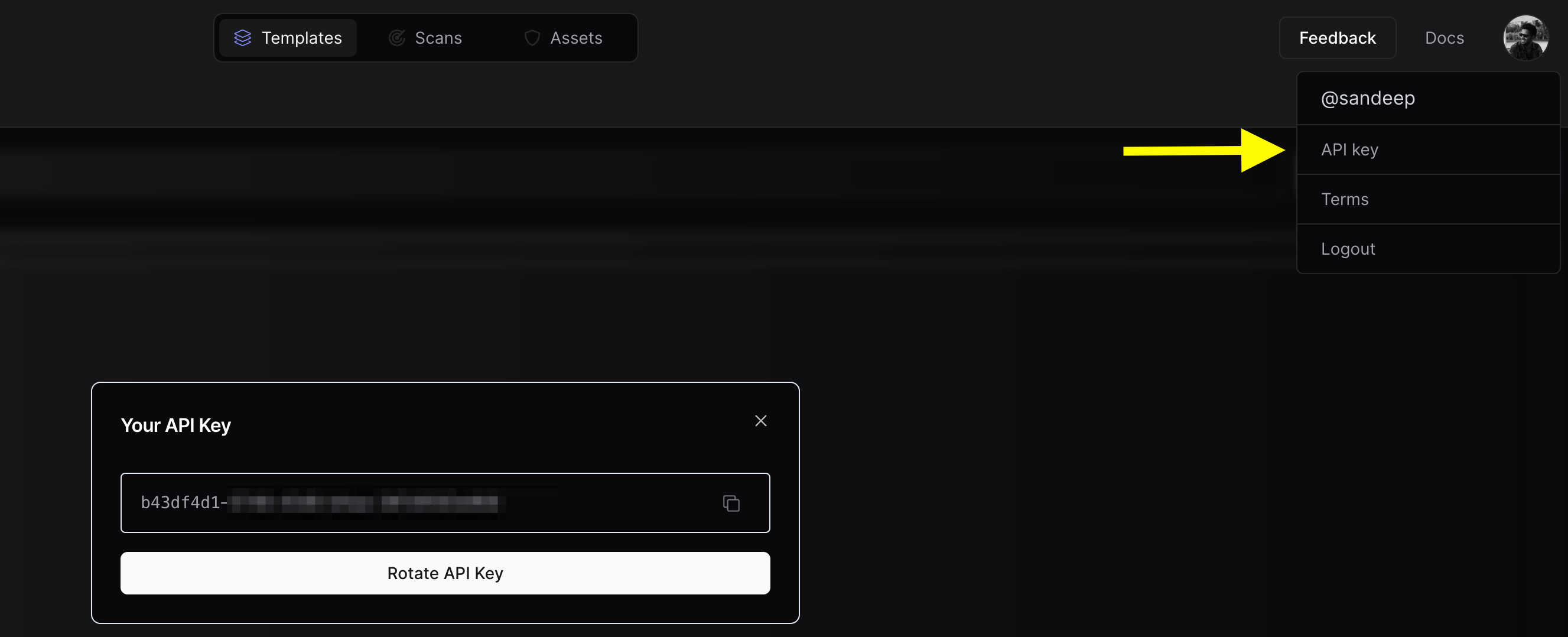
要将您的资产上传到 PDCP,您需要创建一个免费的 API 密钥
配置团队 (可选)
如果您想将资产结果上传到团队工作区而不是个人工作区,您可以配置团队 ID。您可以根据偏好使用 CLI 选项或环境变量。
-
获取团队 ID:

-
CLI 选项:
- 使用
-tid 或 -team-id 选项指定团队 ID。
- 示例:
nuclei -tid XXXXXX -dashboard
-
环境变量:
- 将
PDCP_TEAM_ID 环境变量设置为您的团队 ID。
- 示例:
export PDCP_TEAM_ID=XXXXX
这两个选项中的任何一个都足以配置团队 ID。
使用 UI 仪表盘运行 httpx
要运行 httpx 并将结果上传到 UI 仪表盘:
$ chaos -d hackerone.com | httpx -dashboard

    __    __  __       _  __
   / /_  / /_/ /_____ | |/ /
  / __ \/ __/ __/ __ \|   /
 / / / / /_/ /_/ /_/ /   |
/_/ /_/\__/\__/ .___/_/|_|
             /_/

        projectdiscovery.io

[INF] Current httpx version v1.6.6 (latest)
[INF] To view results on UI dashboard, visit https://cloud.projectdiscovery.io/assets upon completion.
http://a.ns.hackerone.com
https://www.hackerone.com
http://b.ns.hackerone.com
https://api.hackerone.com
https://mta-sts.forwarding.hackerone.com
https://docs.hackerone.com
https://support.hackerone.com
https://mta-sts.hackerone.com
https://gslink.hackerone.com
[INF] Found 10 results, View found results in dashboard : https://cloud.projectdiscovery.io/assets/cqd56lebh6us73bi22pg

上传到现有资产组
要将新资产上传到现有资产组:
$ chaos -d hackerone.com | httpx -dashboard -aid existing-asset-id
设置资产组名称
要设置自定义资产组名称:
$ chaos -d hackerone.com | httpx -dashboard -aname "Custom Asset Group"
额外上传选项
-pd, -dashboard: 启用将 httpx 结果上传到 ProjectDiscovery Cloud (PDCP) UI 仪表盘。-aid, -asset-id string: 将新资产上传到现有资产 ID(可选)。-aname, -asset-name string: 设置资产组名称(可选)。-pdu, -dashboard-upload string: 将 httpx 输出文件 (jsonl) 上传到 ProjectDiscovery Cloud (PDCP) UI 仪表盘。
环境变量
export ENABLE_CLOUD_UPLOAD=true: 默认启用仪表盘上传。export DISABLE_CLOUD_UPLOAD_WARN=true: 禁用仪表盘警告。export PDCP_TEAM_ID=XXXXX: 设置 ProjectDiscovery Cloud Platform 的团队 ID。
扩展示例
将 httpx 作为库使用
httpx 可以通过创建 Option 结构的实例并使用与通过 CLI 指定的相同选项来填充它作为库使用。
一旦验证通过,应该将结构传递给 runner 实例(在程序结束时关闭),并调用 RunEnumeration 方法。
使用 httpx 截图
Httpx 包含使用 -screenshot 进行截图的支持,使用户能够获取目标 URL、页面或端点的截图以及渲染的 DOM。
此功能可以全面查看目标的视觉内容。
当 -screenshot 选项与 -json 选项一起使用时,渲染的 DOM 正文也包含在 json line 输出中。
要使用此功能,请将 -screenshot 标志添加到 httpx 命令中。
httpx -screenshot -u https://example.com
截图是使用无头浏览器捕获的,因此在使用 -screenshot 选项时,httpx 会较慢。
域名、子域和路径支持
-screenshot 选项用途广泛,可用于捕获域名、子域,甚至在与 -path 选项结合使用时捕获特定路径的截图:
httpx -screenshot -u example.com
httpx -screenshot -u https://example.com/login
httpx -screenshot -path fuzz_path.txt -u https://example.com
与其他工具一起使用
在下面的示例中,我们将 subfinder 输出提供给 httpx 截图。
subfinder -d example.com | httpx -screenshot
系统 Chrome 支持
默认情况下,httpx 使用 go-rod 库安装和管理 Chrome 进行截图。
但是,如果您更喜欢使用本地安装的系统 Chrome,请添加 -system-chrome 标志:
httpx -screenshot -system-chrome -u https://example.com
输出目录
截图默认存储在 output/screenshot 目录中。要指定自定义输出目录,请使用 -srd 选项:
httpx -screenshot -srd /path/to/custom/directory -u https://example.com
正文预览
正文预览显示响应的前 N 个字符。并从响应中删除 html 标签。
httpx -u https://example.com -silent -body-preview
https://example.com [Example Domain This domain is for use in illustrative examples in documents. You may use this domai]
httpx -u https://example.com -silent -body-preview=200 -strip=html
https://example.com [Example Domain This domain is for use in illustrative examples in documents. You may use this domain in literature without prior coordination or asking for permission. More information...]